 Word Trainer
Learn vocabulary from your own words
Pre-made decks teach you someone else's words. Word Trainer starts from yours: the ones from your course, your textbook, your job and the street you live on. Add them in seconds, and the app takes care of the repetition.
Why your own words work better
Frequency lists and ready-made decks are built for an average learner who does not exist. The words you actually need depend on where you live, what you do and who you talk to: a nurse, a parent at a kindergarten gate and a software developer in the same city need three different vocabularies.
A word you met yourself already has a story attached: the sign at the pharmacy, the line from the series, the question your neighbour asked. That story is what makes it stick. A word from a random deck has nothing to hold on to.
That is why Word Trainer has no catalogue of decks at all. Your dictionary is the list of words you decided to learn, and every training mode works on that list.
Getting your words in
There are several ways to fill the dictionary, and all of them end in the same place: a word and its translation, which you can group into folders.
- Add words one at a time: type the word, and auto-translation fills in the other side, which you can change before saving.
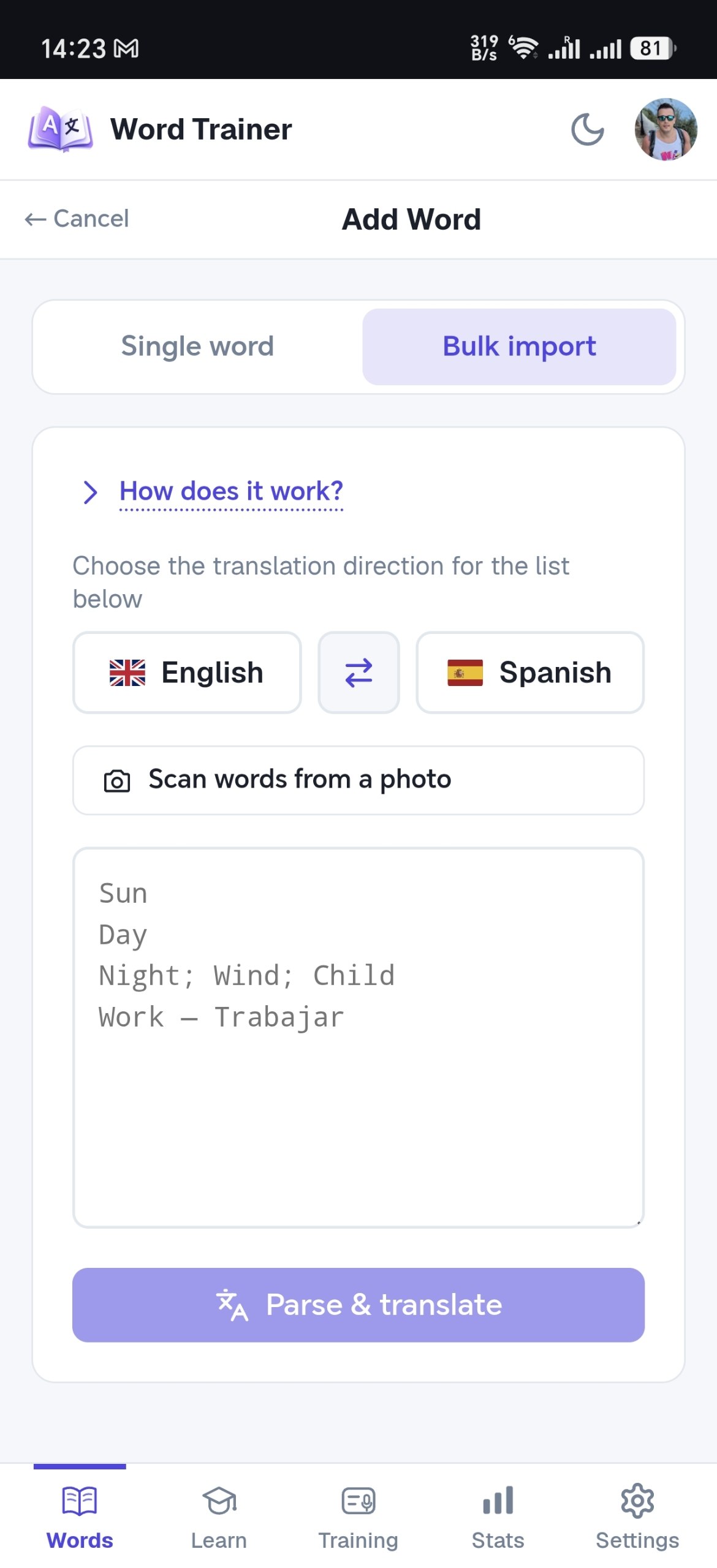
- Paste a whole list: one word per line, or 'word - translation' pairs just as they sit in your notes. Pairs are kept as pairs, words on their own get translated automatically, and you can fix any translation before saving.
- Photograph the vocabulary box of a textbook page or a handwritten list, and the words are recognized from the picture.
- On Android, with the app from Google Play or the site installed on your home screen, share text to Word Trainer from another app: highlight a word in a browser or a messenger, tap Share, pick Word Trainer, and the word opens translated and ready to save.
Folders keep it organized
Words can be grouped into folders: Lesson 12, Work, Kitchen, the name of the series. You can train one folder before a test or the whole dictionary on an ordinary day, and a folder can be shared with a friend or a study group by link, so one person types the list and everyone trains it.
What happens after you add a word
A good first stop for new words is the Learn tab: your words are shown next to their translations, and as you raise the level, more and more letters are hidden until you recall whole words. Flashcards come next, with three honest answers: didn't recall, hard, knew it.
Then comes training: the app shows a word and you type or say the translation. Every answer feeds the spaced repetition schedule, so the words you struggle with come back sooner and the ones you know fade to rare refreshers.
Statistics collect your problem words in one place, so a bad day in training turns into a short list you can drill on purpose.
Tips for a good personal word list
- Add the word in the form you met it. If the sign said 'closed', learn 'closed', not the infinitive from the dictionary.
- Keep one meaning per entry. A word with five translations in one line is five words you will never be sure about.
- Add short phrases, not only single words: 'turn left', 'a table for two'. The trainer treats a phrase like any other entry.
- Add words the same day you meet them. The context is still fresh, and the first repetition lands while the memory is new.
- Do not clean the list too much. A list with a few odd words from real life beats a tidy list you never open.
From any language into any language
Word Trainer supports 17 languages and any pair of them, in both directions: Spanish from English, Italian from German, Finnish from Ukrainian. The interface itself speaks 16 languages, so the app is not only for people who already read English.
Frequently asked questions
Can I paste a word list from my notes or a document?
Yes. Copy the list and paste it into Bulk import: each line becomes an entry, lines written as 'word - translation' keep both sides, and several words on one line can be separated with semicolons. Words without a translation are translated automatically.
Do I have to add translations myself?
No. Type or paste the words only, and the missing translations are filled in automatically. You can correct any of them before saving, and the trainer uses your version.
Is there a limit on how many words I can add?
The free plan holds up to 150 words, enough for a real start, and the paid plans remove the limit. You can paste a whole lesson at once. Automatic translations come with a monthly allowance, which the paid plans raise.
Can I learn from a friend's list?
Yes. Any folder can be shared by link: whoever opens the link imports the words into their own dictionary and trains them on their own schedule. A link stays active for 2 days.
Start with the words you already have
Paste your list, and in a minute you have a trainer built around it. Free to start, no card needed.
Start for free